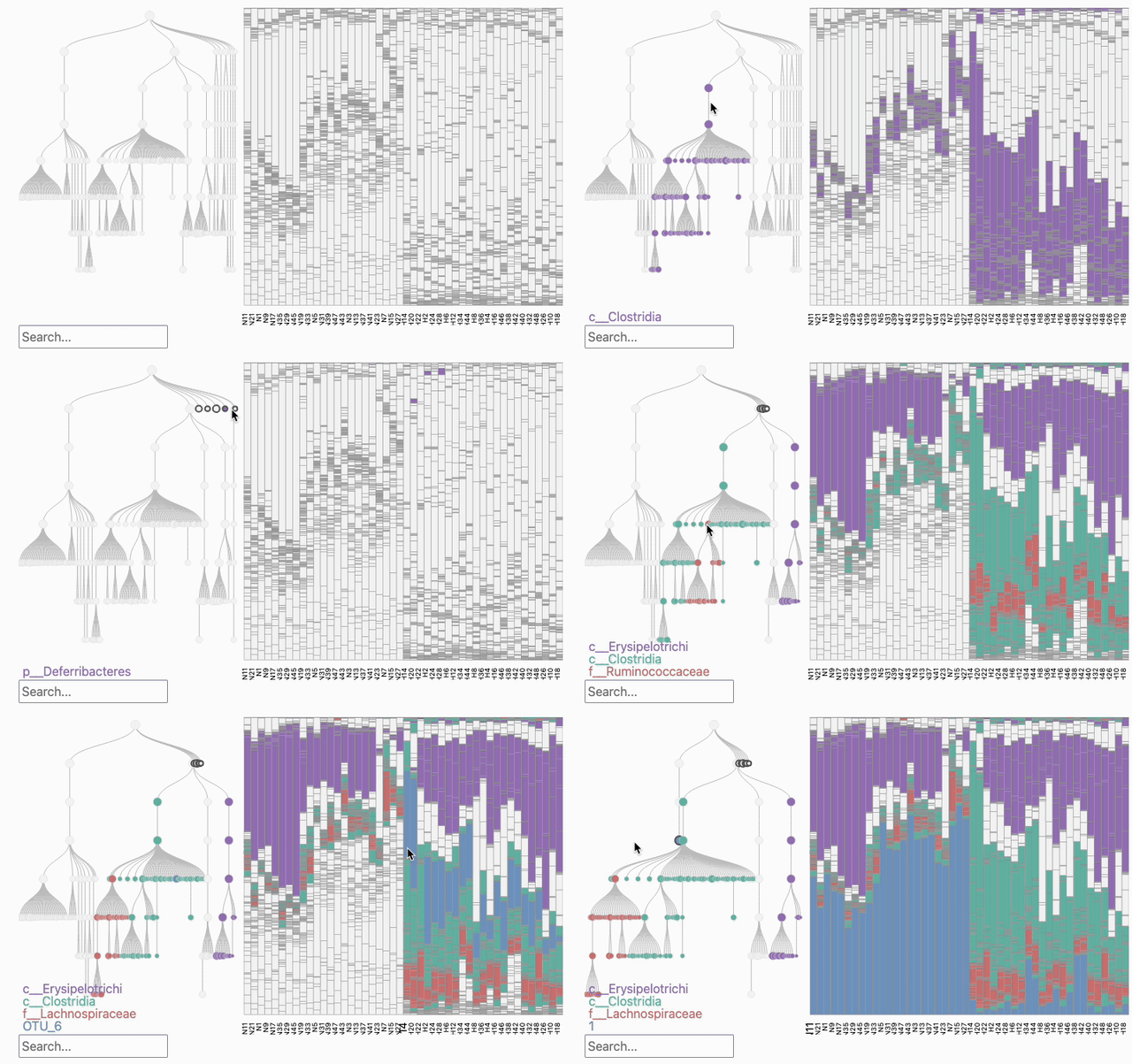
phylobar is a visualization package for constructing stacked barplots by interactively “painting” an associated tree. This is an alternative to defining a color palette at a fixed taxonomic resolution. It also helps avoid the issue of grouping all rare taxa into a color for “other” — you can selectively highlight specific rare taxa while leaving others at their background color.
The main function, phylobar, takes two inputs: a table of potentially normalized counts and a tree structure which can come from either a phylogeny or a table of taxonomic assignments. The vignettes show how to convert alternative data formats (e.g., phyloseq) into this input format. You can export interactive snapshots to SVG using the SVG crowbar package, as shown in the “Exporting Views” vignette. You can read more about the package in our preprint:
Installation
You can install the development version of phylobar using:
remotes::install_github("mkdiro-o/phylobar")Quick Start
This block applies phylobar to a small random data set:
library(ape)
library(phylobar)

tree <- rtree(20)
samples <- matrix(rpois(100 * 20, 1), 100, 20)
phylobar(samples, tree)
You can click a node to collapse a subtree, press the control key to add a new color, and press the escape key to freeze the view. If you want to try some examples right away, we have precompiled articles. Here’s a recording of interactions with the HFHS data.
Common Tasks
- Customizing style: Phylobar supports a few styling customizations, like changing the size of the text labels or the color palette. This vignette walks through currently available options.
- Building a tree from a taxonomy: Rather than interacting with abstract phylogenetic trees it can be helpful to choose stacked bar color using taxonomic assignments. This vignette gets a quick overview of constructing trees from taxonomy tables, including checks to make sure that the input is formatted properly.
- Exporting views: While interactivity is useful for exploration, we often need to export a specific static view to discuss with others. This vignette gives an alternative to simple screenshots that preserves image quality and supports, editing and software like illustrator or inkscape.
- Subsetting to representative samples: Stacked bar plots can be cumbersome when there are many samples (e.g., > 1000) present, because the bars become too thin. This vignette includes some helper functions to create views from representative samples.
Reference
The full function reference can be found here: https://mkdiro-o.github.io/phylobar/reference/index.html.
Learn More
Additional vignettes provide fully developed examples for quality control, cross group comparison, and longitudinal analysis. The package design follows the focus-plus-context principle in data visualization – our paper provides an in-depth discussion. The package is implemented using the htmlwidgets package for R-JavaScript integration. The JavaScript code is available on npm as phylobar-js.
Contact
You can reach us by creating an Issue or emailing ksankaran@wisc.edu. We appreciate your interest and will respond promptly.